Included in your plan
Need more? Pick your limit now — the extra is added to your checkout total and activates as soon as you pay.
10
Custom domains
Premium Domains
EDU Domains
60
History size
35
Favorite Messages
No Ads
Priority Support
See Attachments
Email Forwarding
20
Forwarding Rules
100
Daily Forwards (Per Rule)
Unlimited Forwarding Duration
1000
API Requests / Month
Safe & secure payments
Your card details are never stored. Payments are securely processed using 128-bit SSL encryption.
Accepted Payment Methods
Temp Mail: Your Temporary Email Address
Temp Mail PW offers a secure, and free disposable temporary email address to keep your real mailbox clean and safe from spam. It allows you to receive email at a temporary mail address.
Emails Created | 1,134,631
Messages Received | 1,030,657
Scan the QR Code
Use this QR code to quickly open your inbox on any compatible device
Share this item
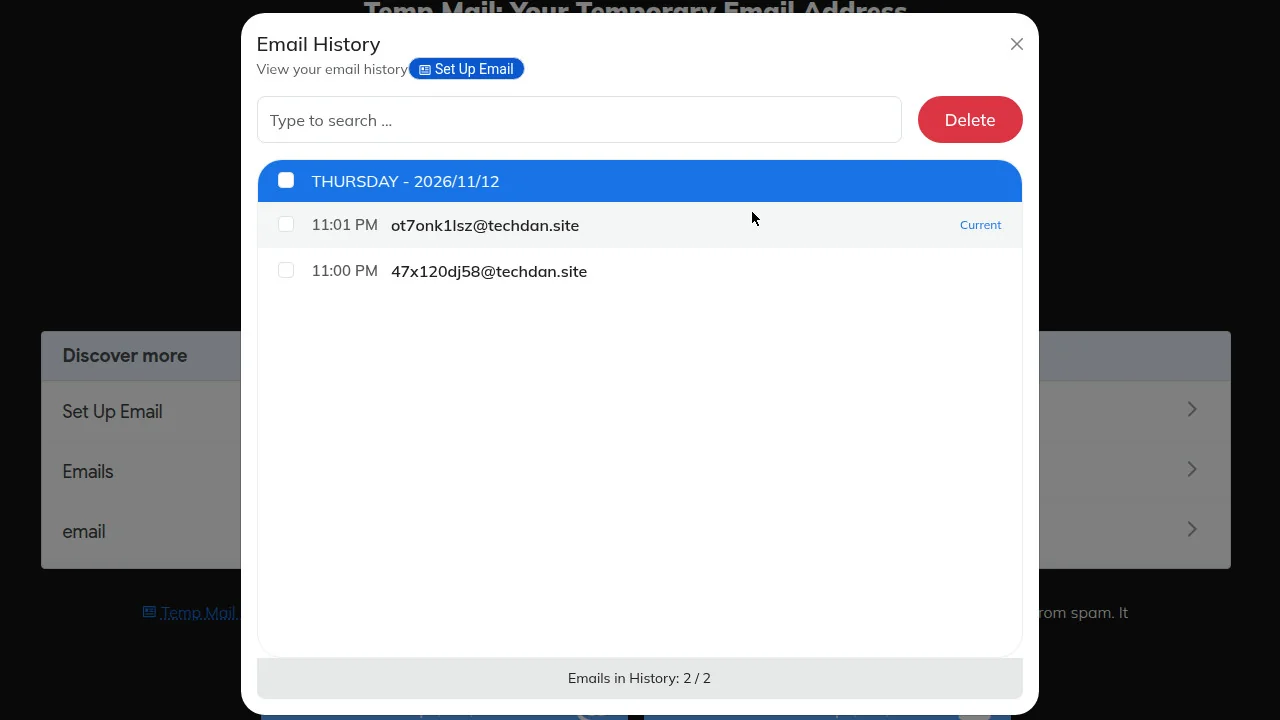
Email History
View your email history
Emails in History: 0
/
2
MailBox
Your Live Mailbox
Mail to your temporary address shows up here the moment it arrives.
Sender
Subject
Time
Your inbox is empty
Waiting for incoming emails. It may take 5 to 20 seconds to arrive here. Kindly be patient :)
Cheers! Happy to announce we received 1,030,657 messages and still counting! Buy us a coffee ☕
Temp Mail Ninja: A Free Temporary Email Address, Ready in One Click
No signup, no password. Copy the address, paste it into any form, and read the reply in your live inbox. Delete it when you're done.
Temp mail is a free temporary email address you can use right away and throw away later. TempMail.pw, also known as Temp Mail Ninja, gives you one the second this page loads. Paste it into a signup form, wait for the confirmation message, and it appears in your inbox, usually within 5 to 20 seconds. You can't send from it, and you never need an account.
It is a disposable email address in the plain sense: a real inbox that receives mail, with no account behind it and nothing to clean up when you are done. You pay nothing for it, and it asks for no personal details.
People call it a temp email, a burner email, a throwaway email, or a disposable mail address. The name changes, the job doesn't: a real inbox that only receives mail, so your own address stays out of the form. Call it temporary email or temp mail, the idea is the same. You hand out an address you can abandon, and your real inbox never sees the signup, the confirmation, or the marketing that follows.
When a temporary email address is the right tool
Some forms want your email and give nothing back except marketing. A free PDF, a seven-day trial, a contest entry, the guest wifi page at a hotel.
A social signup is the same story. Facebook, Instagram, or a forum that wants an address before it shows you the page: give it a temp mail address, get the code, and move on. The account works, and the marketing goes to an inbox you will delete.
For a one-time email like that, an instant inbox does the job and leaves nothing behind. You get the message you need, and the shop's weekly newsletter lands in an inbox you've already deleted. That is why a free temp mail address fits one-off signups so well. The message you need arrives, the rest never reaches you, and there is nothing to unsubscribe from later.
Developers and testers lean on it too. If you're building a signup flow, you need fresh addresses to check that confirmation emails, welcome sequences, and password resets all fire, and creating real mailboxes for that gets old fast. A new Ninja Temp Mail address takes a few seconds. Run the flow ten times before lunch.
Spam is the usual reason people reach for a tempmail address, though the numbers are less dramatic than the headlines. Kaspersky measured spam at 44.99% of global email traffic in 2025, down from 47.27% in 2024. You'll also see 51.8% quoted, but that was December 2025 alone, not the year.
Either way, a global average says little about your own inbox, because what clogs a personal mailbox is much narrower: one forgotten signup that keeps mailing you for years. A temporary address cuts that off at the source. The fix is simple: the address you hand out is not the address you live in.
When it isn't
Don't use a temp address for any account you plan to keep. Password resets go to the address on file, and once that inbox is gone, so is your way back in. The same goes for banking, healthcare, anything with a purchase history, and any work or school login.
A disposable email address has no recovery path, because there is no account to recover. If the service only sends codes to the address on file, and that address no longer exists, the account is locked for good.
One thread on the Privacy Guides forum lands on a rule worth copying: use an address you own for anything durable, and a temporary one only when losing it is harmless. If you want privacy and a way back in, an alias that forwards to your real inbox fits better. The same rule covers free trials that turn into paid plans: if the trial needs a card, the account is durable, and a temporary address is the wrong tool for it.
Temp mail
Email alias
Your real inbox
How long it lasts
Until you delete it
As long as you keep it on
Permanent
Can you reply?
No, receive only
Usually, depends on the provider
Yes
Can you recover the account?
No
Yes, it forwards to you
Yes
Best for
Downloads, trials, testing
Shops and subscriptions you'll keep
Banks, work, government
Need a timed inbox?
Plenty of people search for a specific timer. Each one has its own page: 5 minute mail, 10 minute mail, 20 minute mail, 30 minute mail and 60 minute mail. Pick the length that matches how long the site takes to send its code. A 10 minute mail inbox fits most verification codes, which usually arrive in under a minute. If the site is slow, pick 20 or 30 minutes instead of requesting a new code and starting over.
How Temp Mail PW Works?
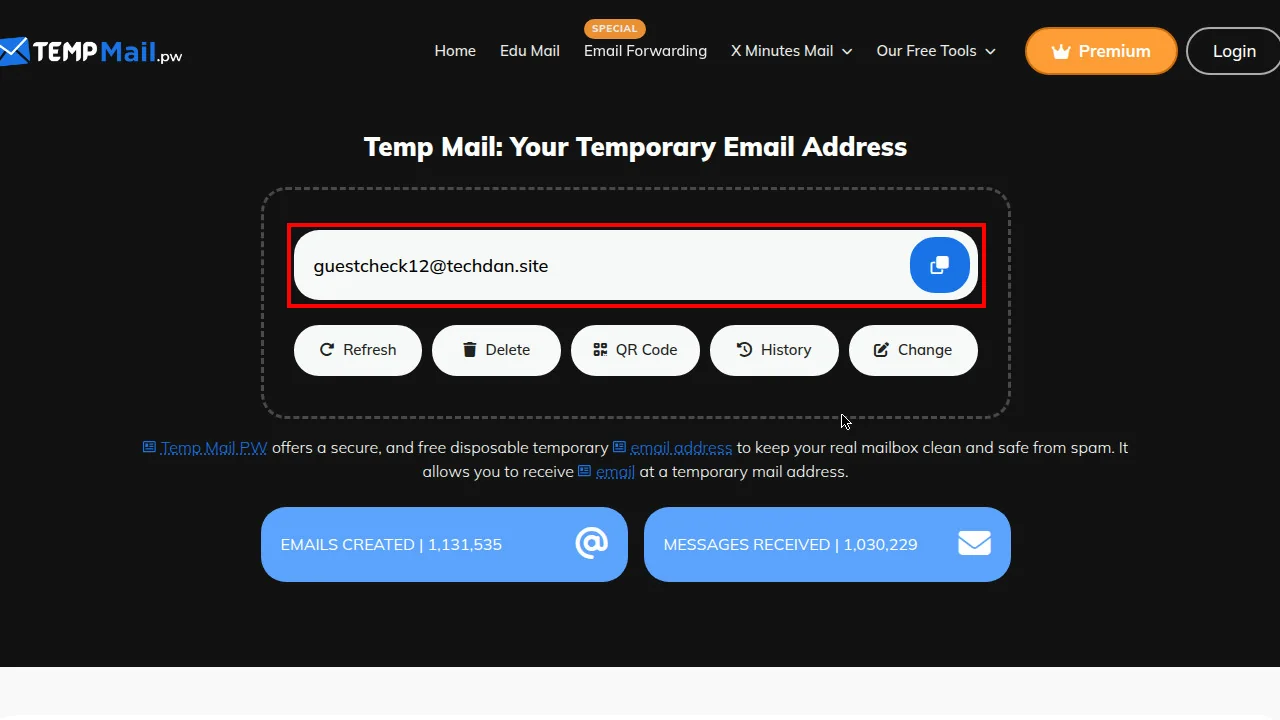
Step 1: Your temp mail address is ready at the top of TempMail.pw
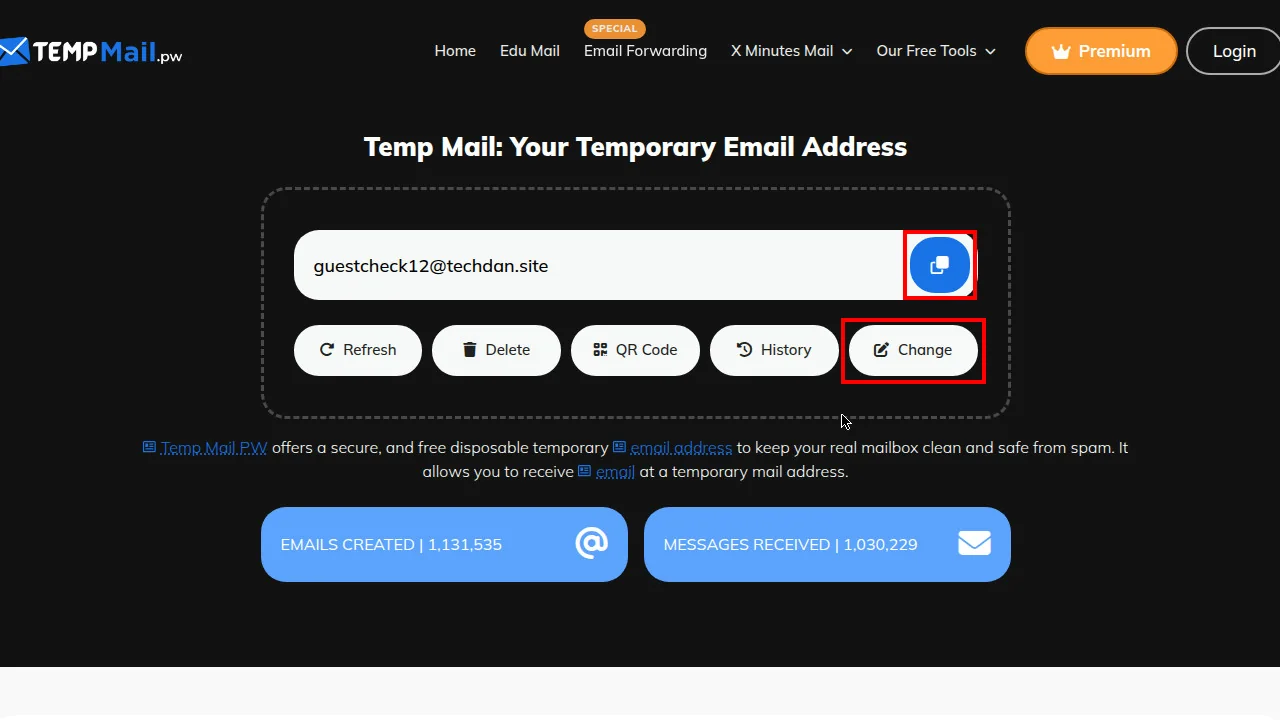
Step 2: Copy your temp mail address, or change the username and domain
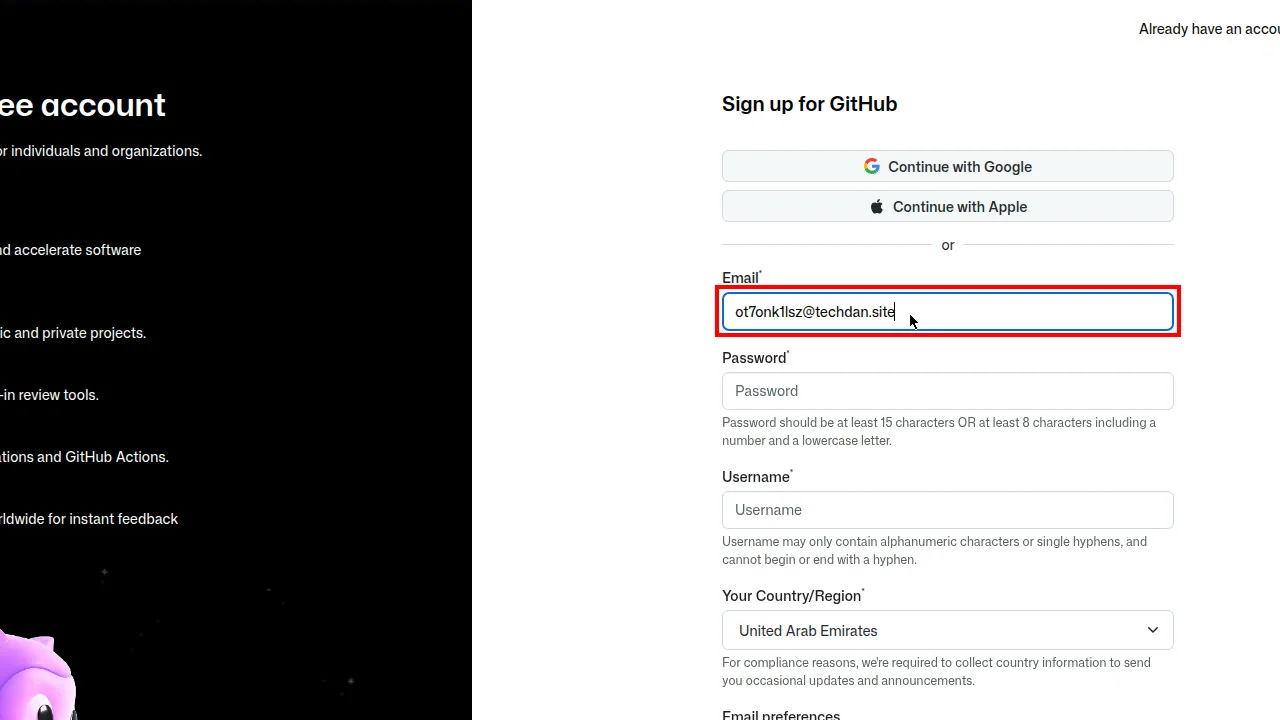
Step 3: paste your temp mail address into the signup form
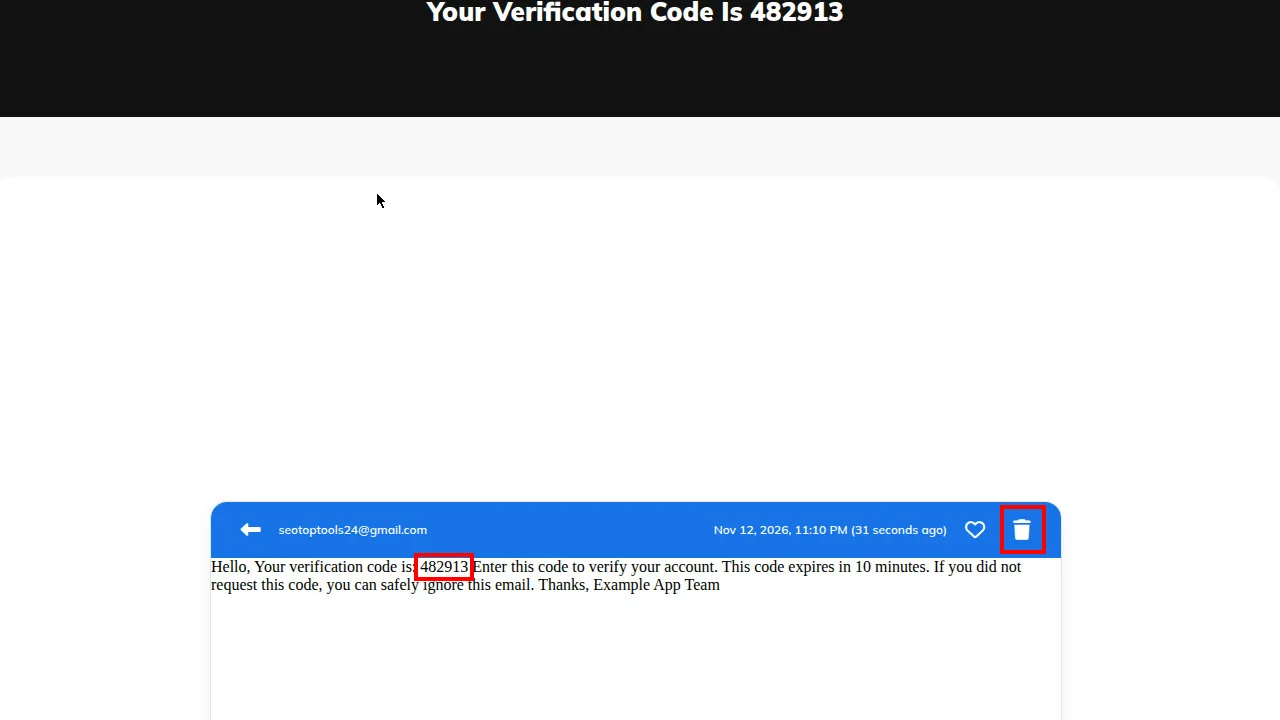
Step 4: Open the message, grab the code or link, then delete it
What do you get with this temp mail generator?
Free use needs no registration. Type your own name before the @ or take a random one, and pick from several domains. The domain choice matters more than it sounds, as the next section explains. Scan the QR code and the same inbox opens on your phone.
The tool is a temporary email generator in the literal sense: it makes the address, shows it to you, and deletes it when you are done. It stores nothing under your name, because there is no name to store.
Incoming attachments are supported, and every file gets a basic malware scan. Basic means common threats, not all of them, so open downloads on a device with antivirus running. Most verification emails have no attachment at all, but a trial that sends a PDF guide or a receipt is easier to read when the file lands in the same inbox as the message.
The service only receives mail. Sending is switched off on purpose, so nobody can use it to push spam.
Old emails clear out automatically, so you don't tidy up after yourself. Paid plans add custom domains, a longer history, more saved favorites, and no ads. A temporary mail inbox is meant to be light: messages arrive, you read them, and they clear out on their own. If you need a message again later, save it to favorites before it expires.
Want an old address back?
Open History in the inbox to see addresses you've used recently and switch back to one. The free plan keeps a short list and paid plans keep more. Save any message you'll need again to your favorites, and if you delete an address, don't count on getting it back.
History is the one place where a temp email address behaves like a real one: the address stays listed, and you can switch back to it while it is still live. Once it expires or you delete it, it is gone for good.
If the email never arrives
Some websites reject disposable domains outright. Others accept the form and quietly never send the message. The usual cause is a site checking your address against a list of known throwaway providers, and the more popular a provider gets, the faster its domains end up on that list.
That is the trade-off of a popular disposable email service: the more people use it, the more sites recognise its domains. A smaller provider lasts longer on those lists, but it usually has fewer domains to rotate through when one gets blocked.
Try this in order. Wait two minutes, since some senders queue messages. Then use Change to pick another domain and request the email once more. If the second domain fails too, the site is blocking the provider, not the address. Use a real address you control for that one signup.
Resist the urge to hit resend five times, because many sites throttle repeats and a code from the first request can expire before the fourth one arrives. If the site still refuses, it doesn't want throwaway addresses. Use a real one. The full checklist is in our guide to why temp mail is not working.
More tools for the same job
The inbox on this page is the main tool, but it is not the only one. If you need a specific kind of address, there is a page for it: a custom email address with your own name and domain, an edu mail generator for student discounts, and email forwarding that sends mail from a temp address to your real inbox. Each of these is a free temp mail tool in its own right, built for one job and nothing else.
Two more are worth knowing. The disposable email checker tells you whether an address belongs to a throwaway provider, and the random name generator gives you a name and profile to go with a signup. Developers can run the same checks through the API, and Temp File Share sends files up to 2 GB without an account. Temp File Share is the odd one out: it sends files, not mail, and it has its own section below.
An API for developers
If you build signup flows or check addresses in bulk, the API does the same work without the browser. It checks whether an address is disposable, creates a temporary inbox, and reads its messages. The Disposable Email Checker is available through the same API, so you can verify an address inside your own signup flow instead of opening the checker page. The API is a paid feature, and the docs list every endpoint with examples.
Temp File Share: send a file without an account
Sometimes the thing you need to send is not a code but a file. Temp File Share is a temp file sharing service: upload a file up to 2 GB, get a link, and the link stops working when the expiry you picked runs out, from 1 hour to 12 months. No account, no sign-up, and the file disappears when it expires.
It is a temp file upload service for the moments email is the wrong tool: a video too big to attach, a folder of photos, a document a client needs today. Share the link, and anyone with it can download the file. Temp file transfer works the same way as a temp inbox: the link is temporary, the file disappears when it expires, and nothing is left behind.
Plans
Pick the Plan That Fits You
Start free. Upgrade anytime for more power and premium features.
AKSVRITH★★★★★Loved by 2698+ subscribers
MonthlyYearly (SAVE BIG)
Free Plan
Free
Great for quick and anonymous email use with limited access
Your card details are never stored. Payments are securely processed using 128-bit SSL encryption.
Accepted Payment Methods
Faqs
Questions, Answered
Answers to the questions people ask most about temp mail.
It’s safe for low-stakes jobs like signups, downloads and one-time codes, because it keeps your real address away from sites you don’t trust. Don’t put anything sensitive in it. Most temporary inboxes aren’t encrypted, and a competitor’s help page notes that anyone who knows the exact address may be able to open the inbox. Treat every message as readable by strangers.
A timed inbox lasts exactly as long as its timer: 5, 10, 20, 30 or 60 minutes. The address on the home page has no countdown and stays usable in the same browser while you keep using it. Messages disappear after 7 days, whatever the address type.
No law bans disposable addresses, so using one is generally legal. It becomes illegal when you use it for crimes such as scams, harassment or impersonation, and the email isn’t the problem in those cases. Some websites ban disposable domains in their terms and can suspend an account that uses one. That is a site policy, not a legal issue. This is general information, not legal advice.
Absolutely! Temporary email addresses support receiving attachments. You can securely download files sent to your temp email.
Yes, for most sign-up confirmations. Paste the address into the form and the code usually arrives within seconds, by our own page text 5 to 20 seconds. Some sites block disposable domains and never send the code. Try another domain, and don’t use temp mail for two-factor authentication or any account you want to keep.
The most common cause is that the site blocks known throwaway domains. Other causes are delayed delivery, rate limits from resending too often, and typos. Wait two minutes, switch to another domain, request the email once, and avoid repeated resends.
Open History to see the addresses you have used recently and switch back to one. The free plan keeps a short list and paid plans keep more. If you delete an address, or its timer already ended, you cannot get it back, so copy anything you need before it runs out.
Temp mail receives messages and is thrown away, so you can’t reply or recover the account. An alias forwards to your real inbox and stays active until you turn it off. Use temp mail for one-off downloads and trials. Use an alias for any account you’ll keep.
No. TempMail.pw is receive-only. Sending is switched off so nobody can use the service to send spam.





 Play Store